OPEN GRAPH IMAGES FOR DEVELOPERS
One prompt. Every page gets its own social image.
Paste the prompt into your AI agent. It designs templates that match your site and adds an og:image tag to every page. You review and ship.
✓ template matched to your brand · rendering…
HOW IT WORKS
Your agent does the design work.
WebShot comes with an MCP server. Once connected, your agent can create and edit templates itself, so your images are built from your site’s actual design, not a generic theme.
Under the hood it’s just an image API: GET api.webshot.co/A1B2C3?title=… returns the PNG. Cached, public, embeddable anywhere.
MCP access is included on every plan, even Free.
HANDS-ON MODE
Prefer to drive? It’s just HTML & Tailwind.
Every template is plain HTML with Tailwind classes, whether your agent wrote it or you did. Edit anything in the dashboard with a live preview. The AI is a shortcut, not a requirement.
THE TEMPLATE
Variables go where content changes
Drop {{ variables }} into the markup for anything that changes per page: a title, an author, a price.
<div class="flex h-full items-center bg-zinc-950">
  <h1 class="text-7xl font-bold text-white">
    {{ title }}
  </h1>
</div>
THE IMAGE
One GET request
Pass the values in the URL and the PNG comes back. The first render takes seconds; repeats are instant from cache. No auth. Embed it anywhere.
<meta property="og:image"
content="https://api.webshot.co/A1B2C3?title=My%20post" />LIVE EDITOR
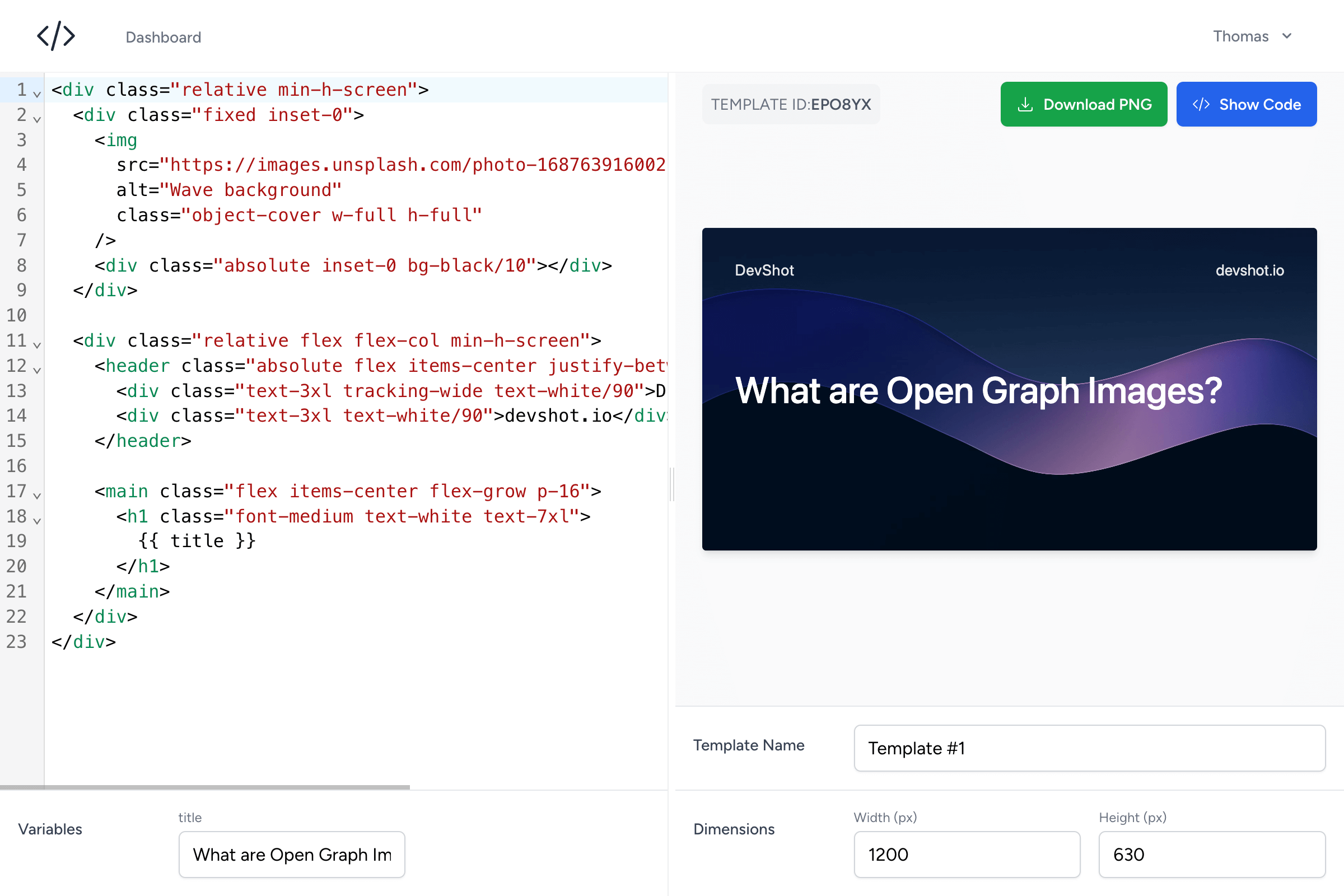
Edit a template, watch it render.
Change the HTML on the left and the preview keeps up as you type. What you see is exactly what ships.
TEMPLATES
Start from something good.
Wave Gradient
Clean Blog Post
Dark Podcast Cover
Social Video Preview
Minimal Accent
Strong Headlines
Laptop Mockup
Minimal Gradient
Your agent can fork any of these with one MCP call. You can too, with one click.
PRICING
Free forever. Upgrade when you outgrow it.
Free
$0/month
- 1,000 image generations / month
- 10 templates
- MCP server access
- Small watermark, removable for $3/mo or a backlink
Pro
MOST POPULAR$20/month · $160/yr
- 50,000 image generations / month
- 50 templates
- MCP server access
- No watermark · priority rendering & support
Questions, answered.
- Do I need an AI agent to use WebShot?
- No. The agent is the fastest path, but everything it does you can do yourself: build templates in the dashboard, add the meta tags to your pages. Templates are plain HTML & Tailwind.
- How does the agent setup work?
- The prompt tells your agent to fetch our setup guide. Your agent asks you for an API token (created in your dashboard, shown once), registers our MCP server, checks the connection, then offers to build templates and wire up your pages.
- What exactly is a template?
- An HTML & Tailwind layout with {{ variables }} for the parts that change per page. You edit it in the dashboard with a live preview.
- What counts as an image generation?
- One render of a unique set of variables. The result is cached, so the same URL can be loaded a million times and it still counts once.
- Do image URLs need authentication?
- No. Image URLs are public on purpose. That’s how X, Slack, and LinkedIn fetch your image when someone shares a link.
- What’s the catch on Free?
- A small webshot.co watermark on your images. Remove it for $3/month, by upgrading to Pro, or with a backlink to webshot.co. How backlink attribution works →
Ship link previews worth clicking.
Copy the prompt, paste it into your agent, and every page gets its own image. The templates are yours to edit anytime.